The dot that wanders.
Tall buildings bounce GPS signals. Most map apps draw every bad reading, so your position jumps across the street and the arrow points the wrong way. You walk two blocks before you notice.
 Modality Maps
COMING SOON · NEW YORK FIRST
Walking and transit guidance that stays steady when GPS doesn’t. From the right entrance to the right exit. On your phone, or just your wrist.
See what’s different“On my trips to New York, I followed the most popular map apps and still walked blocks in the wrong direction — more than once. The dot jumped across the street. The arrow swung while I stood still. I spent the trip second-guessing every corner instead of enjoying the city.”
Tall buildings bounce GPS signals. Most map apps draw every bad reading, so your position jumps across the street and the arrow points the wrong way. You walk two blocks before you notice.
On the wrist, guidance thins out once a trip involves a train. You’re left reading steps, and if you don’t know the city, the phone comes back out at every corner.
Between stations, signal comes and goes. Too often you’re counting stops yourself, or watching the app give up on finding you.
Big stations have many entrances, long platforms, and exits on every corner. Directions to the station don’t tell you which stairs go uptown or which ones lead out to your street.
Modality is built around the moments where other apps leave you guessing. It keeps your position steady along your route, guides you through the station, counts down your stops underground, and adapts when the plan changes.
Every part works on your phone alone. Add a watch, and the phone can stay in your pocket.
In development. The screens and film on this page show our vision for the finished experience.
MODALITY MAPS / INTERFACE CONCEPT
FIX 01 / A STEADY POSITION
Modality combines GPS, your direction, and your steps, and holds your marker to the sidewalk you’re actually on. One stray reading won’t send you across the street, or send you the wrong way.
FIX 02 / FACING FORWARD
The smooth, following view you know from driving, made for walking. The map turns with your progress and keeps the route ahead in view, so you stop rotating the map in your head. Turn the wrong way, and you’ll know within seconds.
FIX 03 / ON BOARD
Once you board, the street map gives way to your journey. Stops count down and your get-off instruction stays close. The trip is saved before you go underground, so guidance keeps going when the signal drops. No error screens in the tunnel.
Illustrative trip · time compressed in this preview.
A big station can be the hardest part of a trip. Modality guides you through it: the entrance for your direction, which end of the platform to wait at, and which way the street is when you come back up.
Illustrative guidance. Station details come from MTA open data, desk survey, and on-site checks, with corrections in two taps.

AT PRINCE ST · UPTOWN
Board near the back
Closest to the Union Sq East exit
W · Uptown≈ 2 min · Scheduled
FIX 05 / PHONE IN YOUR POCKET
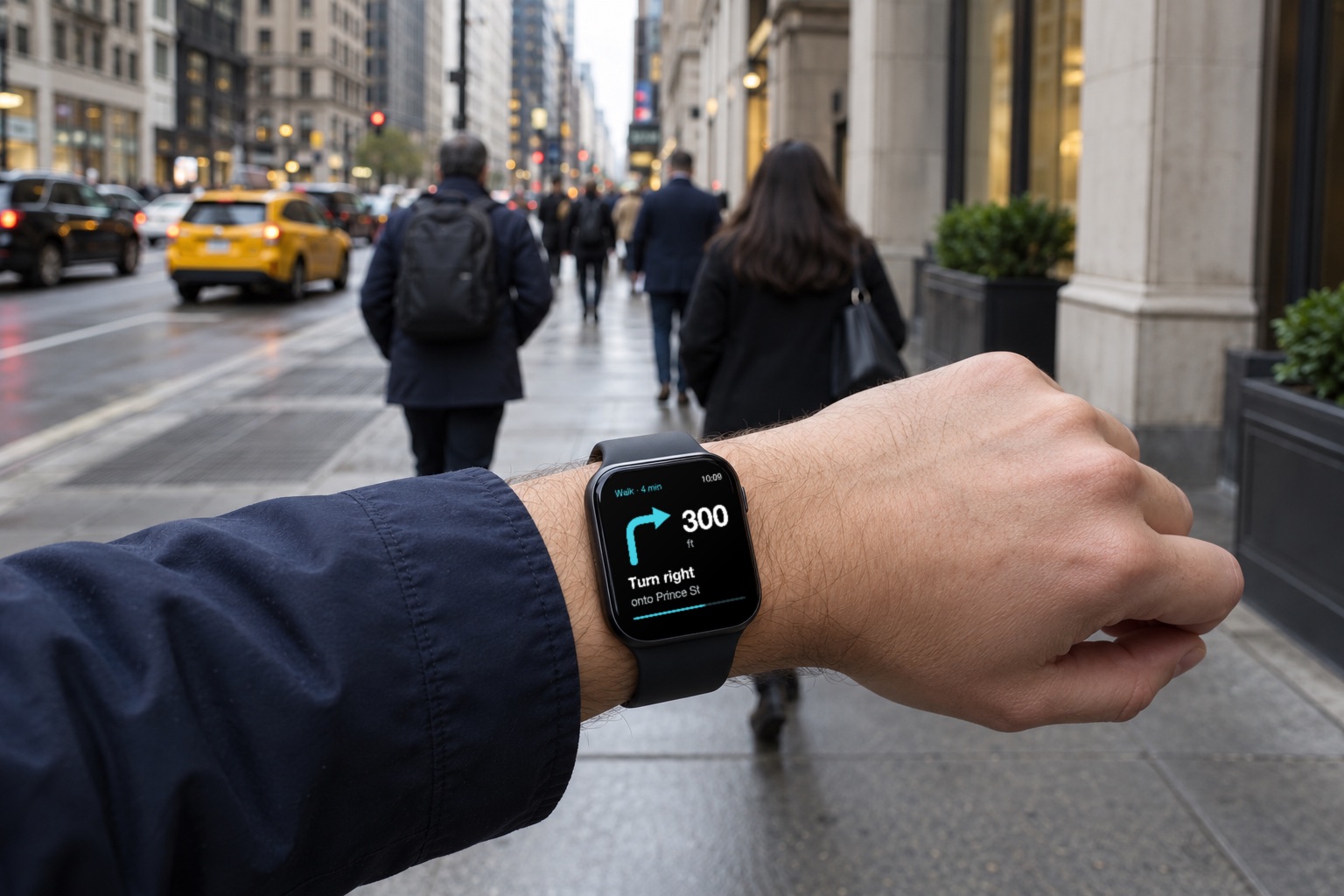
On most watches, guidance fades once your trip reaches the station. Modality guides the whole trip one job at a time: the next turn, the distance to it, and a distinct tap you learn in thirty seconds. Turn left, turn right, board, get off at the next stop, wrong way. You can walk Manhattan with your phone in your pocket.
Planned for Apple Watch and Wear OS. The first iPhone test release comes before the watch app.
Missed a train? Walking slower than planned? Line running local? Modality picks the next workable departure before you miss it and tells you once, calmly, without pushing you to run for a train you can no longer catch.
TRIP UPDATED
Take the 10:24 C instead.
ETA updated · 10:51

The fare on every option, summed across subway, bus, rail, and ferry. Modality also keeps count toward your weekly fare cap, on your device, and tells you when a ride is free.
Step-free trips account for elevators that are out of service right now, not just the ones on the map.
When the subway is running slow, or a crosstown bus or bike share is the better bet, Modality says so before you start. Never mid-turn.
Live times say “Live.” Schedules say “Scheduled.” When the signal is weak, Modality gives you a landmark instead of a confident wrong arrow.
Distinct taps and optional spoken turns let you navigate without staring at a screen, which also helps riders who are blind or have low vision.
Your saved places, walking pace, travel patterns, and fare-cap progress stay on your device. Core navigation is free, always.
“Typical map apps” summarizes our own testing in New York in 2026 and the apps’ public documentation as of October 2026. Individual apps differ and change. Modality capabilities describe the product in development.
Not yet available to testers. No launch date announced.

WHO’S BUILDING IT
I spent 12 years at Apple and three as Chief Technology Officer of Merlin 3D Studio. Today I build software through Nimblor, my company in Dallas–Fort Worth. On my trips to New York, the apps I relied on kept sending me the wrong way. Modality is the navigator I wished I’d had: one that keeps you oriented, guides you through the station, and lets you look up at the city.
BUILT FOR CITIES THAT MOVE TOGETHER
We’re starting where a single trip can mean a walk, a train, and a whole new neighborhood. Then we plan to bring Modality to more cities built around public transit.
Chicago · London · Tokyo
Future ambition. No launch dates announced.A NOTE WHEN WE’RE READY
Leave your email and we’ll let you know when the NYC iPhone TestFlight opens. We’re still building. No launch date, and no invitation to test just yet.